















App Update: Boom Volume Booster And Voila Screen Capture

March 11th, 2013

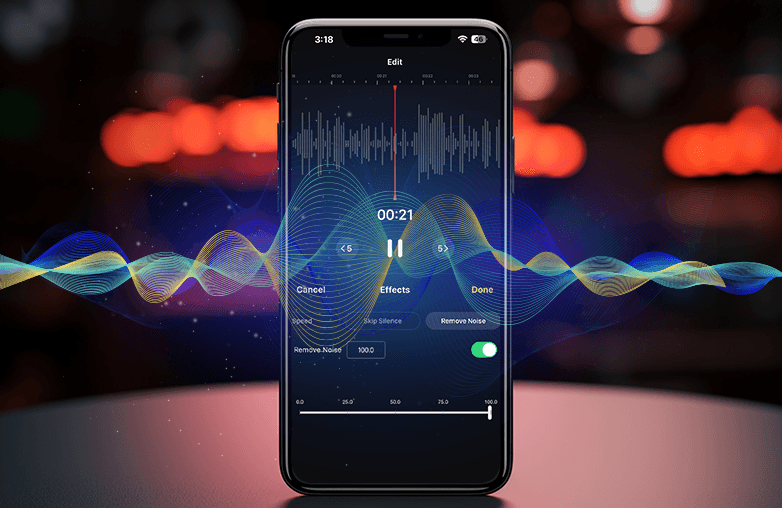
Today we are releasing updates to Boom – the volume booster and Mac equalizer app, and Voila – the Mac screen capture and recording tool. The updates mainly improve the apps’ quality by way of defect fixes and some improvements in the features. Let’s go through the changes we have made to these Mac apps.

Boom volume booster and Mac equalizer app: Some Boom customers running Mac OS10.7.1 to 10.7.3 experienced some missing UI elements. A quick fix was to update their OS to 10.7.4 or to the latest version and this would have automatically fixed it for them. However, we have now fixed this in Boom v1.7 for those who are yet to update their Mac OS X to the latest version. In addition to this, all Boom lovers would get the following 6 new system-wide Mac equalizers to enjoy with your music/video play:
1. Acoustics
2. Classical
3. Electronic
4. Jazz
5. Pop
6. Rock

Voila Mac screen capture app: This all-in-one screen capture and screen recording app for Mac now sports some new options and defect fixes. Below you’ll find few highlights and you can visit the Voila v3.4 Release Notes for complete change log:

1. Voila Helper: The menu bar icon now enables you to screen-capture or screen-record even after you have quit Voila from your Dock. Voila Helper is an option for you to turn on or off from the Preferences; however, the first time you quit Voila it puts up a prompt on whether to run the app in the background via a menu bar icon presence.

Voila Mac screen capture preferencesPlease note, Voila Helper will run only when you have quit the app while it was running from Dock. Quitting Voila app from menu bar icon will not enable Voila Helper to run and you need to re-launch Voila to perform your screen capture or for other image editing needs.

2. Pause/Resume option during screen recording: This is a new addition to the screen recording feature and this option is provided in the status menu. When you start a screen recording, the ‘Pause Recording’ option gets enabled. You can pause the recording based on your needs and the pause recording option changes its status to ‘Resume Recording’. Any action that you perform on your screen when you have paused the recording will not be recorded till you continue recording by clicking the ‘Resume Recording’ option.

3. Voila audio recording component: This is a separate audio recording component that needs to be downloaded and installed on your system. It is a new component that we have built to improve Voila’s audio recording capabilities from the system. When you start a new video recording, you will be prompted to download and install this Voila audio component. Once installed, ‘VoilaDevice’ would get listed under the Sound Output devices in System Preferences. This is a one-time action and you can un-install this audio component from the Voila Preferences –> Video Recording tab.

4. Other improvements and fixes: Tag auto-completion feature helps to find better matches of tags by providing a drop-down list that was added earlier to other image or video files. Postbox mail client support has been added for you to mail the images/videos directly from the Voila app (go to Voila Preferences–>Export–>Default mailing client drop-down to choose this option). We have fixed defects related to error while saving video with USB device selected as audio input, and also the YouTube login authentication problem is now solved.

These are free updates for all the existing customers. Mac App Store users will get a notification badge on the Mac App Store icon. Hit the ‘Updates’ section on the Mac App Store and download the app updates for free. Non Mac App Store version users would get an update notification prompt (if not, click the ‘Check for Updates’ option manually) to download the free update.

We thank our wonderful customers who provide their support, feedback, suggestions to improve our Mac apps and we don’t forget our Beta users as well. Hope you like the new updates and if you are a first-time visitor to the Global Delight site, you can try Boom volume booster and Voila Mac screen capture for free.

~Guruprasad

Boom, Global Delight, Voila , , , ,

Game Your Video Wins Best App Ever Awards!

March 5th, 2013

Hi Everyone.

We are extremely pleased to inform you that Game Your Video has bagged the Best App Ever Awards in two major categories for video apps – Best Video Editing App & Best Creative Video App for iOS.

It has also received honorable mentions for the Best Video App & the Best Video Sharing App.

Gyv_HD


Since its launch, Game Your Video has been on a pretty wild ride with plenty of ups and downs. But one thing has always been constant. Your love and support for which we are eternally grateful. Without you guys this would never have been possible :)

For those who haven’t check it out, get it now and discover why Game Your Video is loved by all.

Connect with your favorite app on Facebook and Twitter to be always in the know of what’s the latest.

Game Your Video, Global Delight , , , ,

Who’s Winning This Oscar Season?

February 24th, 2013

With Oscars just a few hours away, we thought of testing your prediction skills. Some great movies have been nominated this year – Lincoln, Django Unchained, Argo, Zero Dark Thirty. Which one do you think is going to shine?

oscar_wide

Guess the winners in at least 3 of the following 5 Oscar categories and win iTunes Gift Cards.

Best Picture – Argo, Amour, Life of Pi, Lincoln, Silver Lingings Playbook, Beasts of the Southern Wild, Les Misérables, Django Unchained, Zero Dark Thirty.

Best Actor – Bradley Cooper, Joaquin Phoenix, Daniel Day Lewis, Denzel Washington, Hugh Jackman

Best Actress – Jessica Chastain, Quvenzhané Wallis, Jennifer Lawrence, Naomi Watts, Emmanuelle Riva

Best Director – Ang Lee, Benh Zeitlin, Michael Haneke, Steven Spielberg, David O. Russel

Best Screenplay – Michael Haneke, Quentin Tarantino, John Gatins, Wes Anderson/Roman Coppola, Mark Boal

To participate mail your answers to reviews@globaldelight.com. This contest closes on 24th Feb – 7 p.m. EST.

We’ll be picking out the first 3 entrants with at least 3 correct predictions. So hurry up. iTunes Gift Cards up for grabs!


Global Delight

Camera Plus Pro – February Showcase

February 22nd, 2013

One of the best parts about developing a photography app is being able to see all the beautiful photos that people create with it. We’re bringing back the monthly showcase to feature some of the great work that’s being done with Camera Plus Pro.

Share your photos with us by using the hashtag #camerapluspro and maybe you’ll pop up in the Showcase next month. If you like what you see, go give their photos a like.

And as always, make sure you’re following Camera Plus Pro on Instagram!

audreydevoteeCPP


Nature from @AudreyDevotee 

courtneyhaileCPP

Magic tree by @CourtneyHaile

olgabesedinaCPP

Seattle by @olgabesedina

12smithsCPP

Brooklyn by @12smiths

sjvarneyCPP

Mirror by @sjvarney


Camera Plus Pro , , ,

Do The Harlem Shake With Game Your Video!

February 20th, 2013

Move over, Gangnam style. Harlem Shake has arrived.

I am sure all of you must have seen this latest viral dance craze by now. We have been receiving them in gigantic numbers. Here’s one all-girls version by Hanna Cundy:

Two grandmas attempting their version of the Harlem shake:

For those who didn’t know, Harlem Shake is based on an electronic dance track of the same name by Brooklyn-based producer Baauer.

If you want to be the next online video sensation, then just follow the steps below and do the Harlem Shake.

- For 14 seconds one person passively dances while others linger around them motionless

- Then an instant video cut to 14 seconds of bombastic dance music played as many people dance aggressively

- Finally 2 seconds of a slurring sound and slow-motion video of the aggressive dancing

You can use Game Your Video, with some really cool features like cut & join, slow motion and many more spectacular effects, for your version of the Harlem Shake.

Now treat yourself to the original Harlem Shake video if you haven’t seen it already.


Game Your Video, Global Delight , , , ,